
A full schedule.
A calm front desk.
Patients book online, confirm on WhatsApp, approve their treatment plan and sign on their phone. Dental chart, clinical notes and the clinic’s finances in the same system, with nothing to install.
Everything your clinic
needs to see patients.
Schedule, patients, consent forms and payments in one system. No side spreadsheet, no paper to scan and no pile of apps that do not talk to each other.
- Online booking, 24/7Patients book on your clinic website or in the app, at any hour.
- Schedule per dentist and per roomSee each professional’s day and each room’s, with no double-booked treatment room.
- Confirmations on WhatsAppSend the confirmation on WhatsApp with the message already written.
- Reminders and recallsEmail and app notification before the visit, and a recall message when the next check-up is due.
- Online medical historyPatients fill in their medical history before the visit.
- Digital consent forms and contractsConsent forms and treatment contracts signed on the phone, with a drawn signature.
- Online card paymentsPatients pay their treatment plan, a membership or a package by card from the link.
- Clinic website and patient appA ready-made website you edit without a developer, and an app for patients to book and follow their appointments, on iPhone and Android.
- Team permissionsEach person sees only what their role allows, and a dentist can treat patients without seeing prices.
From the dental chart to treatment done.
The patient’s path through the chair, with no paper: what is in the mouth, the approved treatment plan, what was done at each visit and the patient’s signature at the end.
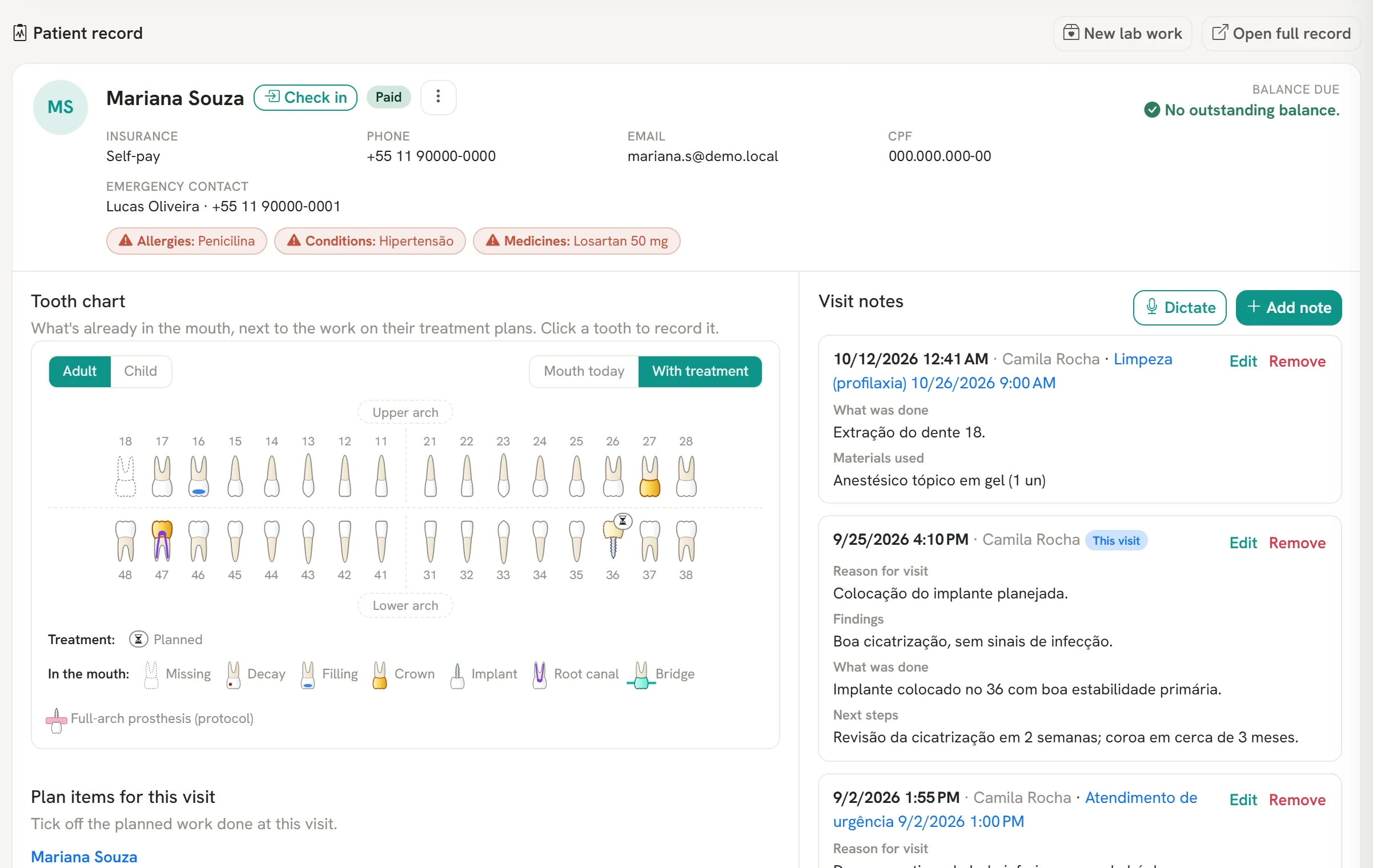
A dental chart that keeps itself up to date
Record what is already in the mouth and see, on the same drawing, what is in the treatment plans. When a procedure is marked done, the tooth changes by itself: filling, crown, root canal, implant or extraction.
- Adult and child teeth, tooth surfaces, bridges and full-arch work
- Planned work shows dashed until it is done
- Click a tooth to record or see its history
A treatment plan the patient approves on their phone
Build the plan from the dental chart, with a discount per item or on the total, a deposit and instalments. The patient gets the link on WhatsApp, sees the prices, chooses how to pay and signs the contract and consent forms in the same step.
- Card payment, or just the signature when the clinic takes payment at the desk
- Automatic reminders for plans with no answer
- The reason for a declined plan is recorded, so you see what did not close
Everything at hand during the procedure
At the visit, the dentist sees what is planned for that patient, opens the procedure’s SOP, writes the clinical note by voice or typing, attaches photos and marks what was done.
- Each procedure’s SOP one click away
- Materials used come off the stock
- Lab work sent to the lab with a due date
The patient signs off what was done
When you finish, ask the patient to sign on the clinic’s screen or by a link. The PDF is kept on the record, with the signed items and the date.
- Prescriptions and documents on the clinic’s letterhead
- Medical history filled in online before the first visit
- Allergies and medications show as alerts on the record
The 3D scan on the patient record.
Upload the intraoral scanner file and open the model in the browser, on a computer or a phone, with nothing to install. Measure, cut, compare before and after, and see where the bite touches first.
- STL, PLY and OBJ, the formats intraoral scanners export
- Contact map: close the bite a little at a time and see which teeth touch first
- Before and after side by side or overlaid, with the alignment saved on the record
- A ruler in millimetres, a section cut and a no-perspective view
- Notes pinned to the tooth, with replies, for your team and the lab
- X-rays and PDFs with markup and comments, linked to the visit
- Only authorized staff can open them, and every access is logged
From the scan to a braces plan
The system outlines every tooth on the scan. You check them, move and turn teeth into line, add the brackets and show the patient the treatment step by step.
The implant planned before surgery.
CT scans (DICOM) open in the browser with nothing to install: axial slices, a panoramic, cross-sections along the arch and the 3D view. Plan each implant safely and turn the plan into a treatment quote.
- Implants from the brands your clinic uses (Neodent, S.I.N., Straumann, Nobel and more), in the real sizes of each line
- Tooth numbers on the panoramic: each implant is named after the tooth it replaces
- The nerve canal traced, and a safety zone around each implant that turns red near the canal, the sinus or another implant
- Bone density where the implant goes, on the D1 to D4 scale
- A PDF report with the panoramic, the sections and the measurements, on the clinic’s letterhead
- Planned implants become lines of the patient’s treatment plan, already priced
- Two CT scans of the same patient side by side, to follow the treatment
The patient sees the result before deciding.
From one photo of the patient, MotionHub Health makes a picture of how their smile may look after the treatment. For example, how the teeth look after whitening. The simulation goes on the treatment plan, the patient’s page and the PDF, always marked as a simulation.
- Made on the spot, on the patient record: pick the photo, tick what the treatment changes, done
- Before and after side by side, with a slider the patient drags on their phone
- The clinic chooses which picture the patient sees; the photo never leaves the record
- The patient’s consent is recorded before anything is made, and every picture carries the simulation notice


Computer-made simulation from the photo. The real result may differ.
Illustration with a computer-generated photo, not a real patient.
The clinic’s finances
in the same place.
Every payment taken at the front desk feeds the cash book, the money owed and each dentist’s pay. No spreadsheet at the end of the month.
Cash flow and profit
Money in by payment method, expenses and each month’s profit.
Money owed
Open and overdue instalments, with a reminder to the patient on WhatsApp.
Dentist pay
Commission per procedure, salary or day rate. Marking it paid books it as an expense.
Stock and cost per procedure
The materials of each procedure, used up at the visit, and a low-stock alert.
Pricing by chair hour
Work out what your chair hour costs and the lowest price for each procedure.
Dental lab
Orders with a due date, where each case stands and what each one costs.
Each person sees what they need
Choose what each role can open. A dentist can treat patients without seeing prices.
Patient data belongs to the clinic.
Health records are sensitive. The system is built so each person sees only what they need, every important action leaves a trace, and the clinic can meet its privacy duties.
- Each person sees only what they needAccess profiles by role. The front desk can be kept out of clinical records, and a dentist can treat without seeing prices.
- Access is loggedWho downloaded each X-ray, scan and CT, and when, stays in the clinic’s history.
- Signatures with proofSigned consent forms, treatment plans and medical histories keep the PDF, the date, the time and the signer’s IP.
- Protected filesPhotos, X-rays and documents open only with a login or through a link the clinic chooses to send.
- Protected connection and sign-inEverything travels encrypted, and sign-in blocks repeated password attempts.
- Your data stays yoursExport patients, finances and reports to Excel and PDF whenever you like.
The clinic in the pocket of your dentists and your patients.
On iPhone and Android. Dentists treat with the record in hand, and patients book, follow and message the clinic.
For the dentist
- The day’s schedule and patient check-in
- The record with alerts, dental chart, treatment plans and notes
- Photos from the camera straight onto the record
- CT and 3D scans opened on the phone
- What they have earned this month, procedure by procedure
For the patient
- Book, reschedule and follow appointments
- Reminders and updates by notification
- Sign the forms before arriving
- Pay what is still open
- Message the clinic from the app
From booking to payment,
without calling the clinic.
- 01
Books the appointment
On the clinic website or in the app, choosing the procedure, the dentist and a free time.
- 02
Gets the confirmation
By email and app notification, then a reminder before the appointment.
- 03
Signs the consent form
On their own phone, before arriving. The front desk prints nothing.
- 04
Pays online
By card, when the clinic charges on the website: a plan, a package or a gift card.
A fixed monthly fee.
No surprises.
One fixed price a month, no fee per booking. You choose the plan when you create the account and can change or cancel whenever you like.
Clinic plans are coming soon. Contact us for launch terms.
- No fee per booking
- Cancel anytime, no penalty
Your clinic ready to
take patients online.
Create the account, add your dentists, rooms and procedures, and start taking bookings on your website.